New Version (1.0.14) of Power Automate Actions Extension

The new version of the extension (1.0.14) introduces import and export functionality for Power Automate actions.
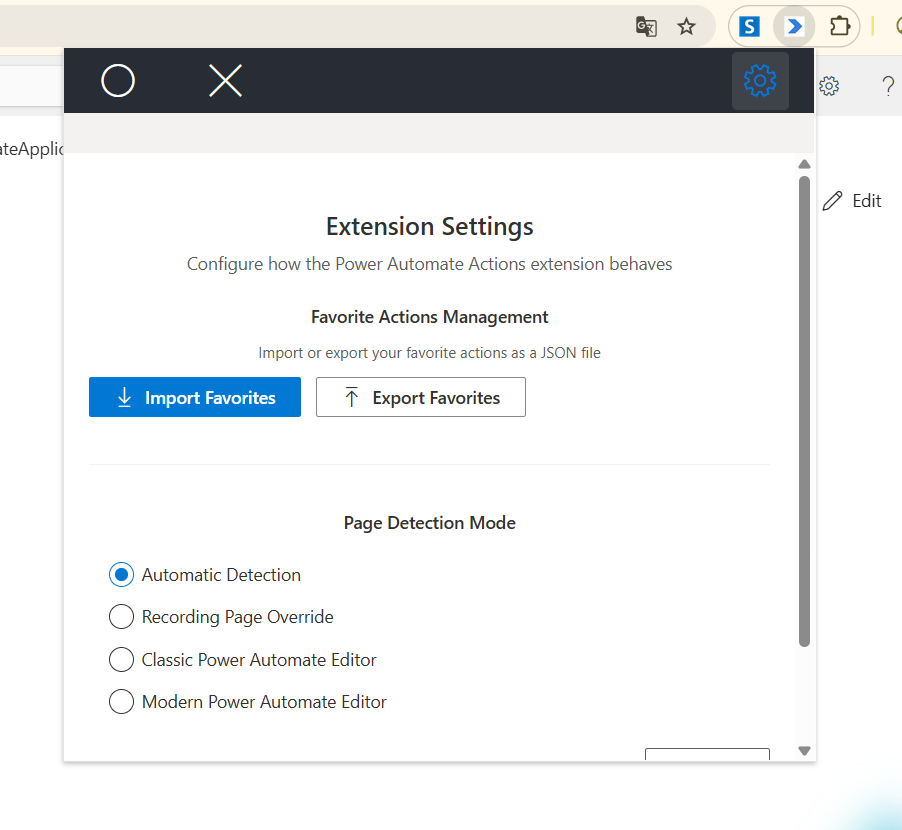
With this new feature, users can now:
-
Export favorites actions - Save your recorded Power Automate actions to a file for later use, sharing with team members, or creating reusable action templates.
-
Import actions - Load previously exported actions back into the extension, allowing you to quickly reproduce complex workflows without manual recreation.
-
Share workflows easily - Exchange action sequences with colleagues, making it easier to standardize processes and collaborate on workflow development.
This functionality is particularly useful for:
- Creating templates for frequently used action sequences
- Documenting and sharing best practices across teams
- Backing up complex workflows before making changes
- Migrating actions between different environments
The export file is organized in JSON format. This allows users to edit specific actions and reuse them in Power Automate.
Full Change Log:
1.0.14
- Export and import favorites functionality.
Power Automate Actions Extension.
To get more information regarding the custom solution, check my previous article on the Power Automate Actions Extension.
How to install the tool?
The tool is available on the Chrome Store.
If you would like to install the extension manually - please unpack the ApplicationBuild zip file and follow the steps described here to install the package locally.
Disclaimer
The tool was meant to ease my daily pains with reproducing steps throughout various workflows. I based it on the current implementation of the Power Automate maker experience and any updates to the interface or underlying processes may cause the tool to stop working. The code is available on GitHub. You are welcome to use it for your personal efficiency and share your feedback in Issues section.