New Version (1.0.15) of Power Automate Actions Extension - Predefined Actions

The new version of the extension (1.0.15) adds a Predefined Actions feature. This feature helps teams create workflows faster with ready-to-use action templates.
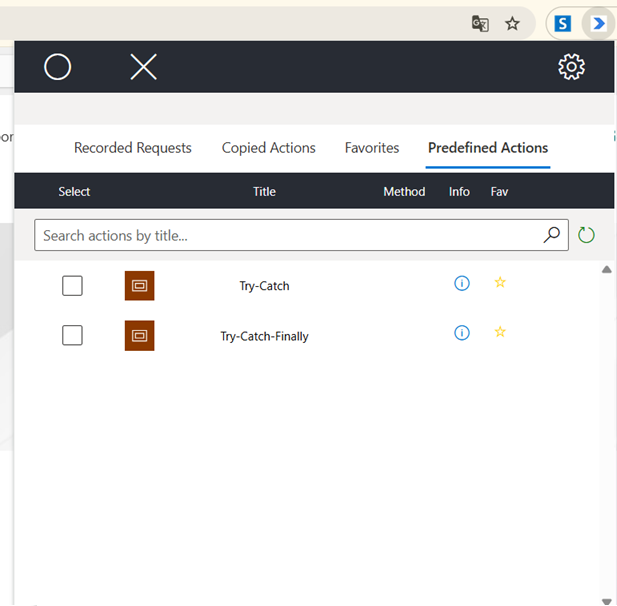
With this new feature, users can now:
-
Set a list of common actions for your team - Create a shared list of Power Automate actions that everyone on your team can use.
-
Set actions as guidelines for your team - Create standard action patterns that show team members the best way to work.
-
Share knowledge of difficult actions - Help your team learn about complex Power Automate actions and share tips with each other.
-
Help new team members start quickly - Give new people ready-made actions and templates so they can start working on Power Automate projects faster.
How to set up the predefined actions JSON file:
-
The file uses the same format as favorites. Add all actions you need to favorites, then export them to a new JSON file.
-
Save the file in a place where all team members can access it (for example: shared drive, SharePoint, or team repository).
-
Work together with your team to add more actions and improve your list over time.
You can test the feature using the sample file currently stored in the extension’s GitHub repository: sharepoint-actions.json
Full Change Log:
1.0.15
- Introduced Predefined Actions
Power Automate Actions Extension.
To get more information regarding the custom solution, check my previous article on the Power Automate Actions Extension.
How to install the tool?
The tool is available on the Chrome Store.
If you would like to install the extension manually - please unpack the ApplicationBuild zip file and follow the steps described here to install the package locally.
Disclaimer
The tool was meant to ease my daily pains with reproducing steps throughout various workflows. I based it on the current implementation of the Power Automate maker experience and any updates to the interface or underlying processes may cause the tool to stop working. The code is available on GitHub. You are welcome to use it for your personal efficiency and share your feedback in Issues section.